
Our own pipeline, asked for a video of a real protein bar, returned a frame with FITNESSHACK across the box. The brand is Fitness SHOCK. A second frame said FITNOCK.
Nothing was wrong with the prompt. The prompt said the right words. The model simply had never seen the product, so it drew a plausible one — and plausible is the exact failure mode nobody warns you about, because a plausible package looks fine until it is your package.
Once it had photographs, the same pipeline returned this:
The format we copied
Someone else's unboxing clip, 360×360. We used the first 15 seconds as the beat structure — nothing from this footage enters the render.
What the pipeline returned
Our creator, our product, 1088×1920 — and the box reads Fitness SHOCK · NO ADDED SUGAR! · 12 pack · 20% protein. Cheap lane, 15 seconds, 5 August 2026.
Here is what actually causes it, and the cheap step that stops it.
Build the product card before you pay for video. It costs nothing to assemble and it is the only thing standing between your brand and a plausible impostor. Start free — or see what a run costs first.
What the model draws when it has never seen your product
Every measurement below comes from two prep runs and one production estimate
on 5 August 2026, on a real brand, costing $0.36 in total.
Given only a text description, the model produces packaging that is confidently wrong in a specific way: the shape is right, the colours are close, and the text is invented. That is worse than obviously wrong. A viewer does not think "the AI got it wrong" — they think you shipped a video of a knock-off.
Text is where it fails first because text is the part it cannot infer. It has seen a million orange wrappers. It has never seen yours.
The fix is a reference sheet, not a better prompt
A product identity card is one image holding several real photographs of the packaging — front, angle, the bar itself. It is built once and handed to every generation after it.
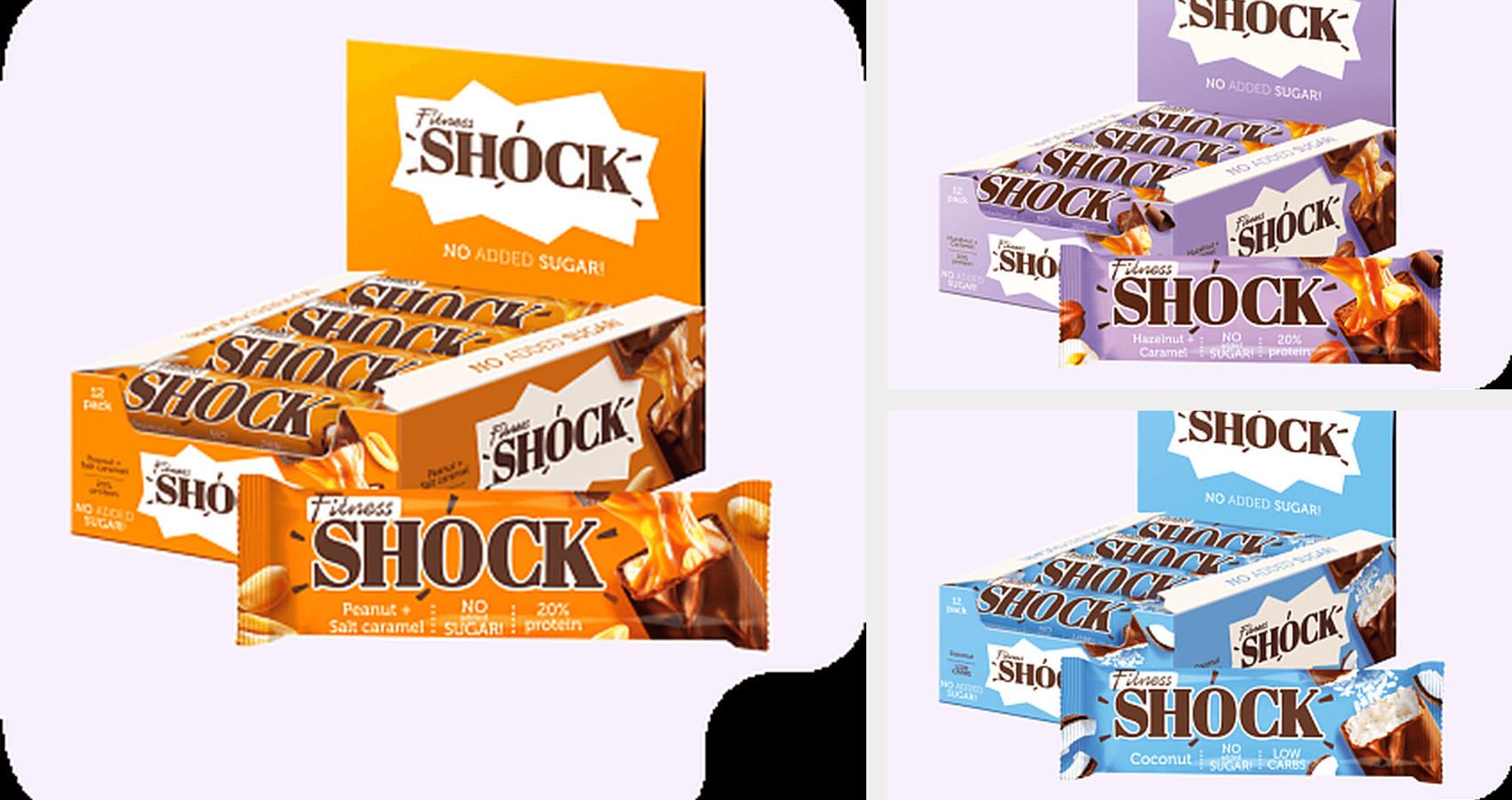
That card costs $0 to build. It is a composition of photographs you already own. And it is the difference between a model guessing at your brand and a model copying it.
The rule generalises past packaging: give it pictures, not adjectives. Any attribute you can photograph should arrive as a photograph.
The trap inside the trap: your product page is mostly icons
This is the part that cost us the money, and it is the reason a card built "from the product page" can still fail.
We pointed the builder at the live catalogue page. It took the first images it found — and those were 30×30 to 35×35 pixels: payment badges, delivery icons, a loyalty stamp. The real product shots, 350×350, were sitting at positions six through eight of the very same list.
The card came back built from upscaled icons. The frame built from that card is the one that said FITNESSHACK.
Filter by size and the same page yields the same card, correctly: after rebuilding with a minimum-dimension filter, every word came back legible — Fitness SHOCK, NO ADDED SUGAR!, 12 Pack, Peanut + Salt caramel, 20% protein. Same page, same code path, one filter.
If you do this by hand, the rule is: never take the first images a page offers. Sort by pixel area and take the biggest. The largest images on a product page are the product; the smallest are trust badges.
Your face has the same problem
The identical failure hits people, and it is easier to miss.
In the same run we asked for a named creator who had no identity card on file. The engine did not stop. It drew frames with no face reference at all — a stranger holding the product — charged full price, and reported the run as a success.
A creator without a reference sheet is not "the creator, approximately". It is someone else. The fix is the same shape: a card built once from real photos, reused by every run.
Why the approval gate sits before the render
The replica pipeline splits into two stages on purpose: prep builds the cards
and the starting frames and then stops for a human, and render spends the
real money.
Priced on production, 5 August 2026:
| Stage | What it does | Cost |
|---|---|---|
prep | product card + starting frames, then stops | $0.22 |
render | the finished 15-second part | $3.69 |
| approval step as a share of what it protects | 6% |
Six per cent. That is the entire argument for looking at a frame before you buy motion. Every defect in this article was visible in a still, before a single second of video existed.
The same arithmetic runs one level down: a starting frame costs $0.11 against $0.72–$3.69 for a clip, depending on the model. Iterate on frames, not on clips — it is the cheapest habit in the pipeline, and it is the same conclusion our model comparison reached from the other direction.
What still drifts, even with a correct card
Honest limits, from the second prep run:
- Small print keeps moving. With a correct card the large brand text held, but fine print drifted: Filnoss for Fitness, 13 Peek for 12 Pack, 30% where the wrapper says 20%. If a number matters legally, do not let a generative model render it — check it, or keep it out of frame.
- Scene state has to be baked into the frame, not asked for. When the beat needed "one bar already out of the box", describing it did not work; the starting frame carrying that state did. The model continues a frame far more reliably than it performs an instruction.
- A source the runner cannot fetch fails after you submit. Pointing a replica at a YouTube link failed on an authenticated-session demand — after the job was accepted. It charged $0.00, but it cost the wait. Use a source the machine can actually reach.
What we would tell someone starting today
- Photograph, do not describe. One card of real shots beats any amount of adjective tuning.
- Take the biggest images, never the first ones. Product pages lead with badges; the product is further down the list.
- Spell the packaging words out in the prompt as well as showing them, and read the small print in the frame before paying for motion.
- Give every recurring person a card too, or the engine will cheerfully render a stranger at full price.
- Look at the still. It costs about 6% of the render and it is where every defect in this article was visible.
This is a first-class option in the product now, not a script we ran by hand: the replica sits in the same Create menu as everything else, and it runs the two stages above — build the cards and the frames, stop for you, then render. See what a run costs, watch the agent plan one, or put it on autopilot.